dropad a8 android tablet
Dropad A8 Review – Android Tablet from Dealextreme

For those who want to buy a good Android tablet, the Dropad A8 is a good one (also know as A8i) and can be purchased at DealExtreme. It comes with Android 2.2, but it possible to update...

invisible ink pen with uv light
Invisible Ink Pen with UV Light

This invisible ink pen (sku.88) is a funny and useful product sold at Dealextreme (and some others stores). With it, you can write hidden messages on a paper and then, when you...

final fantasy buster sword cloud keychain
Final Fantasy Keychains Review (Mini Alloy Weapons from Dealextreme)

In this review we would like to talk about some Final Fantasy keychains (and some cell phone straps too) that we bought at Dealextreme. For those not familiar, Final Fantasy is...

fullmetal alchemist pocket watch
Fullmetal Alchemist Pocket Watch Review

This pocket watch (sku.45307) is specially for Fullmetal Alchemist fans (anime/manga). It is a replica of the silver pocket watch used by the character Edward Elric...

usb 3.0 flash drive 16gb adata
USB 3.0 Flash Drive 16GB Review (ADATA S102)

This USB 3.0 Flash Drive 16GB (sku.103478) is a genuine ADATA S102 device (according to Dealextreme) with read and write speeds of 64 Mbps and 30 Mbps respectively...

Showing posts with label 1080p. Show all posts

Freelander PH20 Review (cheap Android tablet)

freelander ph20 review android tablet freelander ph20 review android tablet freelander ph20 review android tablet freelander ph20 review android tablet freelander ph20 review android tablet freelander ph20 review android tablet freelander ph20 review android tablet freelander ph20 review android tablet freelander ph20 review android tablet freelander ph20 review android tablet freelander ph20 review android tablet freelander ph20 review android tablet freelander ph20 review android tablet freelander ph20 review android tablet freelander ph20 review android tablet freelander ph20 review android tablet freelander ph20 review android tablet freelander ph20 review android tablet freelander ph20 review android tablet freelander ph20 review android tablet freelander ph20 review android tablet freelander ph20 review android tablet


Presentation of the Freelander PH20

In this review, we would like to talk about the 7 inch Android tablet Freelander PH20 that we bought on Dealextreme (sku.166593). We will detail its specs and features later in this review, but for now you should know its price: about $67. Obviously, for this price it is not a top Android tablet, but it performs very well when playing videos or running Android games (continue reading this Freelander PH20 review for details), so consider it as a purchase option.

Besides the Freelander PH20 tablet (SXZ-PH20 - Link-create manufacturer), the package also include the following items:

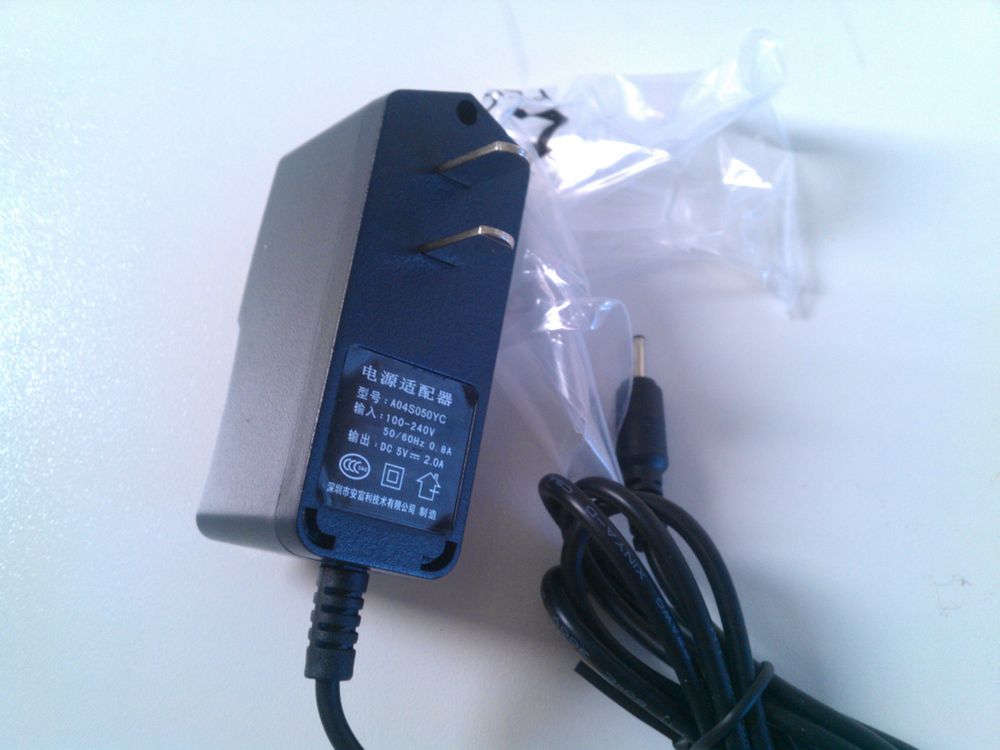
  • 1x Power Supply DC 5V (to recharge).
  • 1x USB OTG adapter (micro B male to standard A female).
  • 1x USB cable (micro B male to standard A male).
  • 1x Start guide (English/Chinese).


Features of the Freelander PH20

Now, to help you know if this Android tablet is worth or not (considering the $67 price), let us describe its main features:

  • Android 4.0.4.
  • Single core AllWinner A13 SoC (CPU Cortex-A8 1.2GHz and GPU Mali-400).
  • 7 inch capacitive screen (5 points) 800x480 of resolution.
  • Memory 512MB DDR3 SDRAM.
  • WiFi 802.11 b/g/n.
  • Front camera 300KP.
  • G-Sensor.
  • 1x TF card slot (maximum 32GB micro SD).
  • 1x 3.5mm earphone jack.
  • 1x USB OTG (supports external USB flash drive, hard disk, keyboard, mouse and some other devices). (*)
  • Rooted (checked with the app "Root Checker Basic").
  • Google Play store already installed.
  • 60 OS languages (the list of languages is shown on the overview video below).
  • Built-in speaker (good sound quality).
  • Built-in microphone.
  • Supports external 3G dongles. (**)
  • Power/Sleep button.
  • Volume up/down buttons.
  • Battery capacity 2800 mAh (3.7V Li-ion) about 3 hours of duration with WiFi on and playing YouTube video.
  • 19.1cm x 11.6cm x 1.2cm of dimensions.
  • 450g of weight.

In our opinion, it is a lot of things for a cheap Android tablet. However, as expected due to its price, it does not have some features that may be important for some. In our opinion, the main missing features are:

  • No HDMI output.
  • No Bluetooth (so far neither with a Bluetooth dongle).
  • No GPS (maybe it is possible to use a USB GPS dongle).
  • No official firmwares so far, but keep monitoring this thread. (***)
  • No custom firmware (we did not find any so far).

Just to clarify things, watch our overview video below showing some features of the Freelander PH20 tablet:


Freelander PH20 - Video Playback Test

As always when reviewing devices capable of play videos, we made (and recorded) some tests to know the video playback performance of the Freelander PH20 tablet.

The tests were put different (codec/format) video files to play and see how well it goes. Note that the ability to play or not a particular codec/format/subtitle is related to software, so installing a proper Android video player app should solve any problem that you may encounter (we used the native video player app). Our tests was intended knowing how well the system can handle video files (1080p, 720p, MP4, etc.), so it is more related to CPU, GPU and firmware.

Check the results for yourself on the video below:

As you probably saw above, all video files played smoothly on the Freelander PH20 tablet.

The formats/codecs of the videos used on the tests was (listed in order of appearance):

  • AVI (AVC/H264) 1280x720 bitrate 4273 Kbps 30 fps.
  • M2TS (AVC/H264) 1920x1080 VBR maximum 25000 Kbps 23.976 fps.
  • MP4 (AVC/MPEG-4) 1920x816 VBR maximum 40000 Kbps 23.976 fps.
  • WMV (VC-1) 1280x720 bitrate 8000 Kbps 29.97 fps.


Freelander PH20 - Gaming Performance Test

Now the part that almost everyone likes: games. For these tests, we chose some free 2D and 3D games available on Google Play (we also used some pre-installed games) to see how well the Freelander PH20 can run them. You can check the gaming performance on the video below:

The games used on the video above are (it runs smoothly if there is no note):


Freelander PH20 - External Devices Test

Since this Android tablet has a USB OTG, you can plug in a USB flash drive (will be mounted at "/mnt/usbhost1"), as you probably saw on the video playback test above, and some other devices. The other ones that we tested was a mouse, a USB 3.0 flash drive (works as USB 2.0), a regular keyboard and a keyboard with a leather case for tablets. All of them worked fine.

We also tried to connect a Bluetooth dongle, just as we did with the Dropad A8, but no success. Maybe it will work in some future firmware (original or custom).


Freelander PH20 - Benchmark Test (AnTuTu, Quadrant and others)

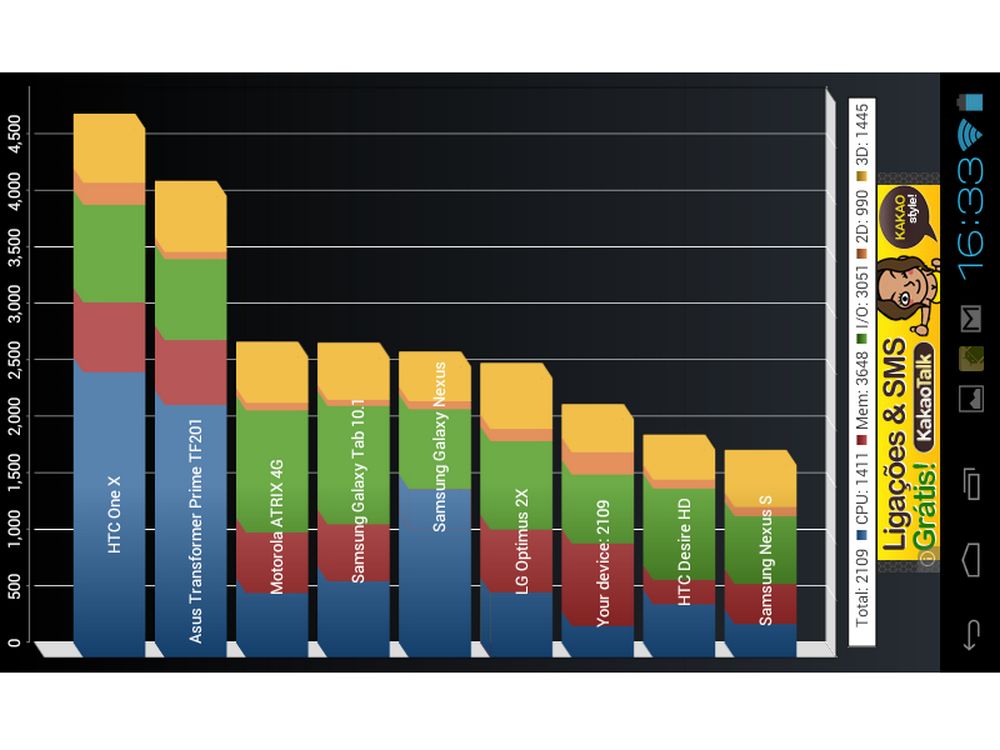
Finally, we tested the Freelander PH20 tablet using some popular Android benchmark apps to see how it scores (points or fps). You can check the Android benchmark apps and the results below or check the detailed benchmark tablet scores on the image gallery at the beginning of this Freelander PH20 review.

  • AnTuTu Benchmark (v3.2.1): 3772.
  • Quadrant Standard Edition (v2.1.1): 2109.
  • Vellamo Mobile Benchmark (v2.0.2): 538 in HTML5 and 187 in METAL.
  • Neocore (v1.9.41): 57.3 fps.
  • NenaMark2 (v2.4): 31.5 fps.


Where can I buy this Freelander PH20?

This cheap Android tablet is for sale at Dealextreme for about $67, more specifically in this link.


Note 1: There may be some incompatible devices.

Note 2: The list of compatible 3G dongles is in one image at the gallery above.

Note 3: It seems there are 3 (three) versions of this tablet: PH20W, PH20L and PH20. You can check the version on the back of the tablet (that code on the corner). We received the PH20L (check image gallery above), which currently do not have firmware updates.

1080p Media Player GK-HD160 Review (GIEC manufacturer)

1080p media player hd160 review giec 1080p media player hd160 review giec 1080p media player hd160 review giec 1080p media player hd160 review giec 1080p media player hd160 review giec 1080p media player hd160 review giec 1080p media player hd160 review giec 1080p media player hd160 review giec 1080p media player hd160 review giec 1080p media player hd160 review giec 1080p media player hd160 review giec 1080p media player hd160 review giec 1080p media player hd160 review giec 1080p media player hd160 review giec 1080p media player hd160 review giec 1080p media player hd160 review giec 1080p media player hd160 review giec 1080p media player hd160 review giec


If you do not find in this 1080p media player GK-HD160 review the information that you are looking for or if you found any wrong information, please use the comments.


Presentation of the 1080p Media Player GK-HD160

In this media player review we would like to introduce you the media player GK-HD160, manufactured by GIEC and bought at Dealextreme (sku.122101). It is capable of playing a lot of audio and video formats/codecs directly to your TV through HDMI cable (or RCA connector).

The hardware features and the package content are:

  • Chipset RealTek 1185DD 500Mhz
  • 256MB DDR2
  • 2GB Internal Nand-Flash
  • 2x USB 2.0 ports
  • 1x HDMI 1.3
  • 1x S/PDIF coaxial
  • 1x CVBS/YPbPr
  • 1x Network LAN port 10/100 Mbps (RJ45) for Internet connection
  • 1x Remote control
  • 2x AAA battery
  • 1x Power adapter
  • 1x RCA connector cable with 92cm
  • 1x Manual (Chinese only)

The 1080p Media Player GK-HD160 Features

Besides simplicity, portability and energy efficiency, there are some other features in this full HD media player that can be useful for someone. We put below its features that we consider important for a media player:

  • Can handle 1080p videos smoothly (check the formats and codecs below).
  • Can handle 720p videos smoothly.
  • Change subtitle color (yellow, white, red and more).
  • Change subtitle size.
  • Change subtitle height.
  • Change charset encoding for subtitles (Unicode UTF8, GBK, Big5, Turkish, Greek, Cyrillic, MS-1256, SJIS, ISO8859-11 and some others) - useful to show special characters.
  • Play files in your USB flash drive or portable hard drive.
  • Play shared files in your local network through wired connection. (*)
  • Fast forward, rewind and "GO TO" option works without a hitch.
  • Play your videos in 3D red-cyan SBS or T-B. (**)
  • Supports FAT16, FAT32, NTFS and EXT3.
  • Browse files by list, preview or thumbnail.
  • Change audio track.
  • It barely gets hot after playing an entire 1080p movie.
  • Resume last played (optional).
  • Choose OSD language (Simplified/Traditional Chinese, English, Spanish, French, German, Italian and Dutch).
  • Different output resolution (1080p, 1080i, 720p, 576p and 480p).
  • "Shutdown After Played" option.
  • Change wallpaper (it is called "Change Xpress" - last option in main menu).
  • Control the media player GK-HD160 through a virtual controller when connected to your local network. (***)
  • Access Internet through native browser.
  • Access to some Chinese CCTV channels.
  • Access to some Chinese movies providers.
  • Able to upgrade the firmware through USB flash drive.

File Formats and Codecs supported by this Full HD Media Player GK-HD160


Video (****)

  • H.264(AVC HD)
  • VC-1(WMV-HD)
  • AVI
  • MKV
  • MPEG-2
  • MPEG-1
  • MPEG-4
  • XviD
  • VOB (and VIDEO_TS folder with menu), but it can't play DVD ISO
  • Bluray ISO
  • DivX 3/4/5/6
  • RealVideo 8/9/10
  • RM
  • RMVB
  • MOV
  • WMV
  • FLV
  • ASF
  • DAT
  • MPG
  • MPEG
  • H.263

Audio (*****)

  • FLAC
  • ALAC
  • APE
  • MP3
  • AC3
  • DDP
  • TrueHD
  • DTS
  • DTS HD
  • WMA
  • AAC
  • WAV
  • OGG
  • REAL audio

Image

  • JPEG
  • BMP
  • GIF
  • PNG
  • TIFF

Subtitle (******)

  • SRT
  • SUB
  • SSA
  • SMI
  • IDX+SUB

The Problems

There are some small issues that we found while using the media player GK-HD160, but in our opinion none of them will disturb its main feature - play video files through USB flash, USB hard drive or local network.

Following are the problems that we found:

  • There are some Chinese labels in some remote control buttons (at least there is a English equivalent just above).
  • Even if you put the menu in English, there are some texts that are not translated (see pictures above).
  • It is complicate to navigate a website using the native browser and the remote control.
  • The Chinese streaming providers aren't translated.

As we already said, these issues are not a big deal if you just want to play your media files, but is something that you should know before buy it.


Testing the Media Player GK-HD160 (from GIEC)

To verify the quality of this media player, we decided to do two simple tests for this review:

  • Play some files of different formats and codecs through a USB flash drive.
  • Play the same files mentioned above but now through wired LAN (local network).

You can see the test with the USB flash drive in the video below, as well as some of the other features of this 1080p media player, but know that the media player was able to play all the files in the two situations above and also to play a 1080p MKV movie without problems.


Sorry for the bad video quality

The detailed information (codec, format, bitrate, resolution, etc) of the files tested in the video above are the following:

  • FLAC (937 Kbps of bitrate) at 0:29.
  • MP3 (128 Kbps of bitrate) at 0:41.
  • JPEG (2560x1600 pixels) at 0:53.
  • JPEG (2560x1600 pixels) at 0:56.
  • JPEG (2560x1600 pixels) at 0:58.
  • AVI (Xvid, 726 Kbps of bitrate and 640x352 pixels) at 1:21.
  • VIDEO_TS folder with VOB files (played as DVD) at 2:38.
  • Bluray ISO (H.264/MPEG-4 AVC, variable bitrate, maximum 22.0 Mbps and 1920x1080 pixels) at 3:12.
  • AVI (H.264/MPEG-4 AVC, 4273 Kbps of bitrate and 1280x720 pixels) at 3:57.
  • M2TS (H.264/MPEG-4 AVC, variable bitrate, maximum 25.0 Mbps and 1920x1080 pixels) at 4:19.
  • MP4 (H.264/MPEG-4 AVC, variable bitrate, maximum 40.0 Mbps and 1920x816 pixels) at 5:05.
  • FLV (H.263, 781 Kbps of bitrate and 320x240 pixels) at 5:48.
  • RMVB (RealVideo 10/RV40, 856 Kbps of bitrate and 720x480 pixels) at 6:11.
  • WMV (VC-1, 8000 Kbps of bitrate and 1280x720 pixels) at 6:25.
  • 3GP (MPEG4, 363 Kbps of bitrate and 352x240 pixels) at 7:03.

By the way, before playing a file through your local network, the media player GK-HD160 tests the LAN speed and show the result in the screen.


Firmware Update

As mentioned early, you can update the firmware of the media player GK-HD160 through a USB flash drive and using the firmware file provided by the manufacturer (GIEC). There are firmware update instructions in the Chinese version of GIEC's website, however, there is not firmware update instructions in the English version of GIEC's website (at least we did not find any).

We will try to contact them and ask for a translation of those instructions to English and, if we receive a positive reply, we will update this review with the English instructions.

Case you know Chinese or want to try update the firmware by yourself, you can find some firmware files here.


Where can I buy this Full HD Media Player?

We bought our GK-HD160 media player at Dealextreme for about $70. If you want to buy it, check this link.


Note 1: Maybe It is possible to use the VAP11G WiFi bridge to connect this media player to Internet wirelessly. We will test it and update this review as soon as we receive ours. (already tested)

Note 2: We did not test them with proper glasses.

Note 3: Type the media player IP address plus "/remote" in your Internet browser (Computer/Cellphone/Tablet). For instance, "http://192.168.1.155/remote". Only some buttons are available (see pictures above).

Note 4: Since we are putting file format and codecs all together, there may be redundant info.

Note 5: Until now, we only heard audios with 2 channels since we do not have a 5.1 or 7.1 audio system. We will update this review as soon as we test that.

Note 6: The subtitle file must have the same name as the video file.