For those who want to buy a good Android tablet, the Dropad A8 is a good one (also know as A8i) and can be purchased at DealExtreme. It comes with Android 2.2, but it possible to update...
This invisible ink pen (sku.88) is a funny and useful product sold at Dealextreme (and some others stores). With it, you can write hidden messages on a paper and then, when you...
In this review we would like to talk about some Final Fantasy keychains (and some cell phone straps too) that we bought at Dealextreme. For those not familiar, Final Fantasy is...
This pocket watch (sku.45307) is specially for Fullmetal Alchemist fans (anime/manga). It is a replica of the silver pocket watch used by the character Edward Elric...
This USB 3.0 Flash Drive 16GB (sku.103478) is a genuine ADATA S102 device (according to Dealextreme) with read and write speeds of 64 Mbps and 30 Mbps respectively...
In this review we would like to present to you a Xbox 360 wireless receiver that we received from Chinabuye (SKU:23243). With this device, you can connect a Xbox 360 wireless controller on PC (Windows and Linux) and also on Android devices (smartphones and tablet). Note that this Xbox 360 gaming receiver is only required if you want to use a Xbox 360 wireless controller (not the wired controller).
The product package comes with the following items:
Xbox 360 wireless gaming receiver (160cm of USB cable).
Driver CD (drivers for Windows 32/64 bits, PDF with installation instructions and the "Microsoft Xbox 360 Accessories" software).
To use the Xbox 360 wireless receiver, the following tasks must be done:
Step 1: Plug the PC wireless gaming receiver in a USB 2.0 port. (*)
Step 2: Turn on the Xbox 360 controller (press and hold that GUIDE button in the center).
Step 3: Press and hold the button on the receiver (its light will start blinking).
Step 4: Press and hold the connect button on the top of the Xbox 360 controller.
Step 5: Wait until the lights (controller and receiver) stay on - that means both are connected. (**)
How to connect a Xbox 360 Wireless Controller to Windows or Ubuntu
If it is the first time plugging it, it probably will be necessary to install the Xbox 360 wireless receiver driver. For Windows users, there is the CD included in the package with drivers for Windows 32 or 64 bits (XP, Vista or Seven). For new Ubuntu users (***), the receiver probably will work as soon as you connect it, but know that there are tools to ease the task.
Case you need installation instructions, check the proper tutorial link just below:
As usual, we prepared some tests to see the capabilities of the product. For this Xbox 360 wireless receiver, we tested if a gamer is able to use it in different OS's (Windows and Ubuntu), how far is the wireless range, which type of application it is compatible and if it is possible to use more than one Xbox 360 controller on the receiver.
Testing the connectivity in different OS's (Windows and Ubuntu)
We tested it and confirmed working on the following OS's:
Windows XP SP3 - 32 bits.
Windows 7 - 64 bits.
Ubuntu 12.10 - 32 bits.
Testing the wireless range of the Xbox 360 Wireless Receiver
For this test, we just connected one Xbox 360 controller to the PC wireless gaming receiver and move the controller away to see how far it works. It was able to keep working in a distance about 7.5 meters (batteries fully charged and with walls obstacles).
You probably will not use the Xbox 360 controller far away from the PC wireless gaming receiver, but we made this test and put it on this review just in case someone needs that info.
Testing the Xbox Gaming Receiver in different applications
Probably a gamer want to use this gaming receiver to play Steam games or emulators games on PC. So, we tested it in these two situations. Both worked fine (plug and play) without the need of extra configuration (emulators need mapping). However, case you encounter some game/emulator with Xbox 360 controller compatibility issue, know that there are softwares like Xpadder and MotionInJoy to try to fix some problems.
Testing if more than one Xbox 360 Controller can be used simultaneously
This one is for those who like to play games with friends. We managed to test 3 (three) Xbox 360 controllers with this Xbox 360 gaming receiver and all of them worked fine (simultaneously) on GoldenEye 007 (Mupen64 - Nintendo 64 emulator) and Cadillacs and Dinosaurs (Kawaks - arcade emulator).
Unfortunately, we were unable to test if this PC wireless gaming receiver works with the Xbox 360 Wireless Racing Wheel and Xbox Wireless headset (we do not own them).
Where can I buy this Xbox 360 Wireless Receiver?
This Xbox gaming receiver is on sale for about $10 at Chinabuye, more specifically in this link.
Note 1: Pay attention if you are not plugging it in a USB 1.1 port (generally those front panel USB ports on older PC's).
Note 2: Under Linux, only the receiver light will stay on. The controller light will keep blinking, but you will be able to use the Xbox 360 controller anyway.
Note 3: Distros with kernel +2.6.26 (or newer) probably already come with the new xpad module.
With this little USB device you can plug it in your computer and capture audio and video signals from RCA or S-Video inputs, which includes VCR's, video games and surveillance cameras signals. In other words, you can use this USB video capture adapter as a "RCA to USB" adapter as well as a "S-Video to USB" adapter and configure some PAL and NTSC settings.
The product package contains the capture adapter, a manual from EasyCap, a 50 cm USB extension cable and a CD with some drivers and a capture software called "Ulead Video Studio 8.0 SE DVD". Depending on your operation system, the drivers included on CD may not work in your computer.
In Dealextreme there is another version of this adapter (sku.11267), but we do not know the differences. We only know that using this video capture adapter reviewed by us we managed to use it in a Windows Vista x64 and in a Windows XP SP3. Also, there are some users at Dealextreme that said they have managed to install this device in some Linux and Mac OS systems. Below are some driver links (we only tested the Windows Vista x64 driver).
http://www.macupdate.com/app/mac/32004/easycapviewer (Mac OS X drivers)
http://www.megaupload.com/?d=L11B2G6U (Vista and Seven x64 drivers)
Ease of use
You can easily use it by plugging it in one of the USB ports of your computer, installing the drivers (if the operation system does not install automatically) and opening the viewer software included on CD to start capturing any audio and video signals from an external device plugged in the RCA or S-Video input.
If the capture software included on CD it is not enough, you can use another capture software (VirtualDub or Windows Movie Maker, for examples).
Price
About $9 can be considered a very cheap product. Once we saw this product in a mall store here in Brazil for about $80 (eighty dollars).
Usefulness
You can use it to record video game playing (Xbox 360, PS3 and others), convert VHS to DVD, watch and record on the computer video signals from surveillance cameras and some other things.
For those who want to buy a good Android tablet, the Dropad A8 is a good one (also know as A8i) and can be purchased at DealExtreme. It comes with Android 2.2, but it possible to update it to Android 2.3 (and possibly to 3.0 in future).
Regarding the hardware, it has the fast Samsung S5PV210 Cortex A8 1 Ghz as CPU (processor), 512 MB of RAM memory, a built-in 4 GB NAND FLASH to store data (~2 GB are being used by Android), 7 inch capacitive multi-touch screen (some revisions allows 3 points multi-touch), dimensions 19.5 cm x 12.3cm x 1.3 cm (7.67 in x 4.84 in x 0.51 in), 300K pixels (low quality) front camera (downside) and 802.11b/g WiFi connection (also able to use an external 3G adapter), but does not has built-in Bluetooth or GPS (continue reading this Dropad A8 review to know a workaround).
About the slots, it has:
1x Micro SD/TF card slot (support up to 16GB)
1x mini HDMI (output to connect it in TV's or monitors)
1x mini USB OTG (for instance to connect it to computer)
1x mini USB HOST (for example to plug-in an USB Bluetooth dongle, a flash drive or a keyboard)
1x 3.5mm Stereo Audio output
1x Power Supply (to recharge)
Besides the Android tablet Dropad A8 itself, the following items are also included in the package:
1x AC power adapter (100/240V
US plug)
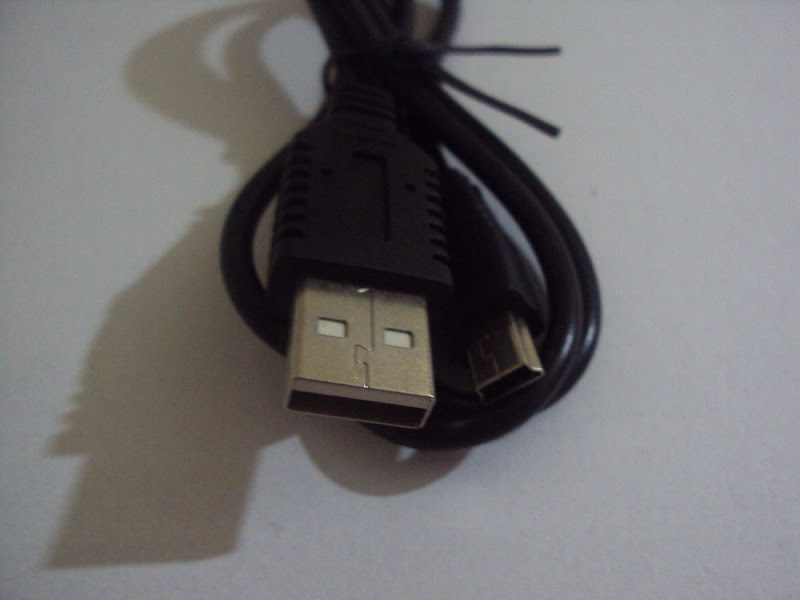
1x mini USB male to USB female cable (13.5 cm or 5.31 in)
1x mini USB male to USB male cable (77 cm or 30.31 in)
1x earphone
1x user guide
Continue reading this Dropad A8 review to know more information about this product.
Ease of Use
Like almost every Android device, the Dropad A8 has the buttons POWER, MENU, BACK (on the top) and HOME (front) to help the user to navigate through Android OS and applications (see images of them on the top of this Dropad A8 review).
Case typing messages with a screen keyboard (touch) is not practical, you can plug in the mini USB tablet slot (labeled USB Host) a regular USB keyboard (use the mini USB to USB cable). We tested an USB Hub (sku.48 - our is 1.0 when plugged in PC's) together with an USB keyboard and mouse. It works. For Bluetooth mouse, use the application "BlueInput".
On the side, at the middle of the slots, there is a lock switch that, when switched towards the TF slot, does not allow the user to turn on the tablet. Otherwise, it allows.
Some Dropad A8 owners report that the Market, the application through users can download and install another applications, does not list some applications, but you can download APK files from websites like 4Shared and install yourself.
As we already told in this review, this Android device does not has build-in Bluetooth nor GPS, but you can use Bluetooth if you plug in an USB Bluetooth dongle (like sku.6678) and use an external Bluetooth GPS (like sku.26337) with the application "Bluetooth GPS Provider" (free in the Market). However, be aware that Bluetooth dongle only works on Android 2.3 (obviously does not work Android 2.2). For more details, watch the videos on the Infinity Reviews YouTube channel (link below in this review).
Price
For about $185, the Dropad A8 is a cheap product sold at Dealextreme (free shipping), but is a good Android tablet. Comparing it with the Samsung Galaxy Tab, both have a Cortex A8 as CPU (processor) and 7 inch of screen, two important aspects. However, regarding the price, and considering the current economy (Brazil), the Samsung Galaxy Tab is 4 (four) times more expensive than the Dropad A8. That difference probably will be different in other locations.
Anyway, if you don't want to spend much money acquiring a good Android tablet, the Dropad A8 is a great candidate.
Build Quality
Besides the front camera, another downside of the Dropad A8 is that it is a little heavy (570 grams or 20.11 oz), which might be a little uncomfortable if you intend to use it for several hours. Maybe a stand holder (like sku.70974) can help in some occasions. Other bad thing is that the Dropad A8 gets a little warm, so do not overdo it.
The tablet has a good capacitive screen and comes with a screen protector, but we recommend that you buy a soft protective pouch like sku.31519 to avoid scratches and dust. It is not cool, but it is useful.
Regarding the software, specifically about the Android OS, there are some bugs in the factory default Android 2.2 and also in some others official firmwares. To know what are the bugs, we recommend that you read the topics on the product page at Dealextreme. Some users share their experiences with some firmwares, including how to upgrade the device (currently we are using the firmware 20110531). If your tablet stopped working after an unsuccessful attempt to update firmware, read this topic explaining how to revive a "dead" Dropad A8.
In the product page, there is an user (Elmarg) saying that after three months his tablet stopped working properly and he got a RMA (send back the defective and receive it repaired or a new one). According to that page, the manufacturer offers one year warranty (read about the coverage) and the Dealextreme's office may help forwarding the defective item to the manufacturer. So, if you experience some serious problem with your tablet, request a RMA to Dealextreme.
Usefulness
As you probably know, there are a lot of applications you can install and use in your Dropad A8 tablet. Just for curiosity, below are some information about some useful applications (that we tested) grouped by profiles (general purpose of use).
I. For Gamers
- 2D and 3D Android games are working great without lags (Dropad A8 has a fast CPU).
- There are a lot of video game emulators in the Market (and Internet) such as Nintendo 64, Super Nintendo, Mega Drive, GBA and Nes. As we tested too little games, we don't know which ones are working properly (without bugs), but we recommend that you search such information on the product forum (link below in this review).
- If you are planing to play more seriously you might want to use a real Wiimote on the video game emulators (see our YouTube channel for more detail).
- Some firmwares have a bug in the gravity sensor that makes some games unplayable, like Doodle Jump. Stay tuned the new official firmwares.
- This Android tablet doesn't have the Nvidia Tegra II chip (GPU), which means games needing it (Samurai Vengeance II for instance) won't work. Maybe the application Chainfire3D can be a workaround (we didn't tested it, so be careful!).
II. For Internet Browsing
- For Internet browsing, there are two goods free applications in the Market, "Miren Browser" and "Dolphin Browser HD".
- Flash Player 10.3 is working well for video playback (for example YouTube) and flash gaming (for instance Kongregate).
III. For Social Networking
- A good audio and video calls application is "Fring", but do not expect too much of the Dropad A8's bad camera. Skype also works (tested version 2.0.0.47), but it doesn't have video calls yet.
- Facebook, Twitter and Talk are working well on this tablet.
IV. For Video Playback
- A great video player that we recommend is the mVideoPlayer (tested version 2.9.1). It has a good playback performance (AVI/MP4/FLV/RMVB/MKV) and supports external subtitles, including files with accented characters (auto detect ANSI and UTF-8).
- We tested a 720p video (MP4 file extension, AVC/H264 codec and variable bitrate 5.7-12.6 Mbps) on mVideoPlayer and it ran smoothly (without lags).
- We tested two 1080p videos:
a MP4 extension (AVC/H264 codec, 23.976 fps, 1920x816 and variable bitrate 8-22.4 Mbps)
a MKV extension (V_MPEG4/ISO/AVC codec, 23.976 fps, 1920x1080 and bitrate 12.1 Mbps)
The MP4 file ran with few lags and the MKV file ran with many lags. If you intend to play 1080p videos on the Dropad A8, which may be a waste of battery because there isn't too much difference between 720p and 1080p running at 800x480, then pay attention to the codec and bitrate of your video file (use FormatFactory to see such information).
V. For Navigation
- Before using a navigation application, remember that, to use GPS on the Dropad A8, you need Android 2.3, an USB Bluetooth dongle, an external Bluetooth GPS (like sku.26337) and the application "Bluetooth GPS Provider". We didn't know if USB GPS's are working with Dropad A8.
- A good GPS navigation application that is working with Dropad A8 is the "iGO" (tested version 8.4.2.139242). Other applications that are working with external Bluetooth GPS's, however with less features than "iGO" are "Google Maps" and "Locus" (there is a free version in the Market).
VI. For Developers
- Instead of debug applications on Android emulator, developers can debug them directly on the Dropad A8. That can be very useful, for example, if you are developing an application that requires good performance of the system, otherwise the user's usability will be compromised (such as games). The "Device ID" ("ADK Manager" on Eclipse) value is "0123456789ABCDEF".
- This device has 200 dpi of screen density (hdpi) and a "large" screen (according to Android developer guide).
Report generated by the Android application "AnTuTu Benchmark" (version 2.1) - Dropad A8 score is 3040