dropad a8 android tablet
Dropad A8 Review – Android Tablet from Dealextreme

For those who want to buy a good Android tablet, the Dropad A8 is a good one (also know as A8i) and can be purchased at DealExtreme. It comes with Android 2.2, but it possible to update...

invisible ink pen with uv light
Invisible Ink Pen with UV Light

This invisible ink pen (sku.88) is a funny and useful product sold at Dealextreme (and some others stores). With it, you can write hidden messages on a paper and then, when you...

final fantasy buster sword cloud keychain
Final Fantasy Keychains Review (Mini Alloy Weapons from Dealextreme)

In this review we would like to talk about some Final Fantasy keychains (and some cell phone straps too) that we bought at Dealextreme. For those not familiar, Final Fantasy is...

fullmetal alchemist pocket watch
Fullmetal Alchemist Pocket Watch Review

This pocket watch (sku.45307) is specially for Fullmetal Alchemist fans (anime/manga). It is a replica of the silver pocket watch used by the character Edward Elric...

usb 3.0 flash drive 16gb adata
USB 3.0 Flash Drive 16GB Review (ADATA S102)

This USB 3.0 Flash Drive 16GB (sku.103478) is a genuine ADATA S102 device (according to Dealextreme) with read and write speeds of 64 Mbps and 30 Mbps respectively...

Qanba Q1 Arcade Stick Review (for PS3 and PC)

qanba q1 arcade stick review ps3 pc qanba q1 arcade stick review ps3 pc qanba q1 arcade stick review ps3 pc qanba q1 arcade stick review ps3 pc qanba q1 arcade stick review ps3 pc qanba q1 arcade stick review ps3 pc qanba q1 arcade stick review ps3 pc qanba q1 arcade stick review ps3 pc qanba q1 arcade stick review ps3 pc qanba q1 arcade stick review ps3 pc qanba q1 arcade stick review ps3 pc qanba q1 arcade stick review ps3 pc qanba q1 arcade stick review ps3 pc qanba q1 arcade stick review ps3 pc qanba q1 arcade stick review ps3 pc qanba q1 arcade stick review ps3 pc qanba q1 arcade stick review ps3 pc qanba q1 arcade stick review ps3 pc qanba q1 arcade stick review ps3 pc qanba q1 arcade stick review ps3 pc qanba q1 arcade stick review ps3 pc qanba q1 arcade stick review ps3 pc qanba q1 arcade stick review ps3 pc qanba q1 arcade stick review ps3 pc


Presentation of the Qanba Q1 Arcade Stick

It is time for arcade stick review! We bought the Qanba Q1 arcade stick (Cut version) from Dealextreme (sku.169538) and would like share our experience with it. So far, is a great arcade stick for PS3 and PC. I, the person who is writing this review, was used to play fighting games on keyboard, PS2 and Xbox 360 wireless controller, until I decided to get this Qanba Q1 arcade stick. Not sure how it performs compared to a Mad Catz or other famous arcade sticks that come with Sanwa or Seimitsu parts, because it is the first that I bought. However, for me, it was a good deal since I am starting on fighting games. Continue reading this Qanba Q1 arcade stick review to know more about it and conclude for yourself.

The product cost about $100 and comes with the following items inside the package:

  • 1x Qanba Q1 Arcade Stick (Cut version).
  • 2x Table clamps (check the image gallery above to understand its usefulness).
  • 3x Restrictor gates/plates (square, circle and octagonal) - 1 installed and 2 spare.
  • 2x Dummy buttons (dummy mounting hole cover used to fill empty button holes - no function).
  • 1x Cleaning cloth.
  • 1x Chinese manual (and some others Chinese papers).

Check the Qanba Q1 unboxing video below to see those items.


Features of the Qanba Q1 Arcade Stick

As you probably already know, this Qanba Q1 arcade stick is for PS3 and PC, which is a good feature (it would cost more money to support Xbox 360), but that is not the only feature to a serious fighting gamer looking for a new arcade stick. So, we put below its main features (our opinion):

  • Arcade stick for PS3 and PC (Qanba Q4 RAF is compatible with PS3, PC and Xbox 360).
  • 185cm USB cable (there is a compartment on the left).
  • 13 buttons (8 on the right of the stick).
  • Turbo function (2 modes - detailed later in this Qanba Q1 arcade stick review).
  • Equipped with Qanba buttons and Qanba stick (Omron microswitch).
  • Anti-slip bottom pad (on the arcade stick and on the table clamp).
  • Adjustable / removable table clamps (check image gallery for dimensions).
  • Weight: about 2.0 Kg (2.7 Kg packaged).
  • Dimensions: 33.5cm x 21cm x 5.5cm (without clamps).

Case those features are too much for your needs, the Dealextreme also sells other arcade sticks. Try to find a cheaper one that fits your needs, but know that it probably will have an inferior overall quality (stick, buttons, features, etc.).


What are the Compatible Fighting Games?

There are a lot of fighting games compatible with this cheap arcade stick. Actually, every game tested so far worked fine. If you have problems, try to go on "button config" menu of your game and configure for yourself.

Case you are curious about the online fighting games library, know that this Qanba Q1 arcade stick can be used for you to play some PS3 games, like:

  • Super Street Fighter IV: Arcade Edition.
  • Ultimate Marvel vs. Capcom 3.
  • The King of Fighters XIII.
  • Street Fighter x Tekken.
  • Tekken 6.
  • Blaz Blue.

For PC users, there are a lot of online fighting games options, most of them are classic fighting games that can be played on GGPO/Supercade (or similar software). Some of these PC games are:

  • Super Street Fighter IV: Arcade Edition.
  • Street Fighter x Tekken.
  • The King of Fighters 2002.
  • The King of Fighters 98.
  • Super Street Fighter Alpha 3.
  • Garou: Mark of the Wolves.
  • Super Street Fighter 2 Turbo.
  • Marvel vs Capcom.
  • Street Fighter 3: 3rd Strike.
  • Vampire Savior (aka Darkstalkers).

Obviously, the lists above are only examples. There are many other fighting games for PC and PS3.


How to Turn ON the Turbo Function (2 modes)

This Qanba Q1 arcade stick has 2 turbo modes: one that will activates when holding a button (manual turbo) and one that will keep a button in turbo (automatic turbo). Each button can have only one of those two modes activated per time and the turbo function is activated per button. When USB cable is disconnected, the turbo memory will be lost.

Now, to turn ON the turbo in one button, do the following:

  • Step 1: Press and hold the turbo button (top-left).
  • Step 2: Press and hold the button that you want to activate turbo.
  • Step 3: Release the picked button.
  • Step 4: Release the turbo button.

After that, the turbo light should be on. That means that button you pressed is in "manual turbo", which means when you press and hold it, the turbo on it will activate.

If you repeat all the previous steps, for the same button, it should enter in "automatic turbo", which means that button will keep in turbo automatically. If you press it, the turbo on that button will off temporary. If you release it, the automatic turbo will come back.

Finally, to disable the turbo in one button, do the same previous steps. Briefly, these are the orders of the states in one button:

  • 1. Button starts with turbo OFF.
  • 2. Do the steps above. The button will enter in manual turbo.
  • 3. Do the steps again. The button will enter in automatic turbo.
  • 4. Do the steps for the third time. The button will turn OFF turbo function.


Square Gate vs Circle Gate vs Octagonal Gate

qanba q1 circle restrictor gate qanba q1 octagonal restrictor gate qanba q1 square restrictor gate qanba q1 how switch restrictor gate

As mentioned early, the package contains 2 restrictor gates (or restrictor plates). Case you do not know, the stick has one of it inside it to limit the movements (check the last image above for better understanding). Depending which restrictor gate you use (square, circle or octagonal), and depending which fighting game you are playing, you will probably have different experiences. For instance, this Qanba Q1 arcade stick came with the square restrictor gate. After some time playing SSF4AE, I (person writing this Qanba Q1 review) noticed that I was missing too much commands (hadouken, shoryuken, special moviments, etc.), so I decide to switch the restrictor gate. After removing the square restrictor gate and plugging the octagonal restrictor gate, my command execution got better.

Anyway, you should try different restrictor plates. It is easy to switch them (check the image gallery above) and the results can be satisfying.


Modding the Qanba Q1 Arcade Stick

qanba q1 arcade stick inside view qanba q1 arcade stick inside view qanba q1 arcade stick inside view qanba q1 arcade stick inside view qanba q1 arcade stick inside view qanba q1 arcade stick inside view qanba q1 arcade stick inside view qanba q1 arcade stick inside view qanba q1 arcade stick inside view qanba q1 arcade stick inside view qanba q1 arcade stick inside view

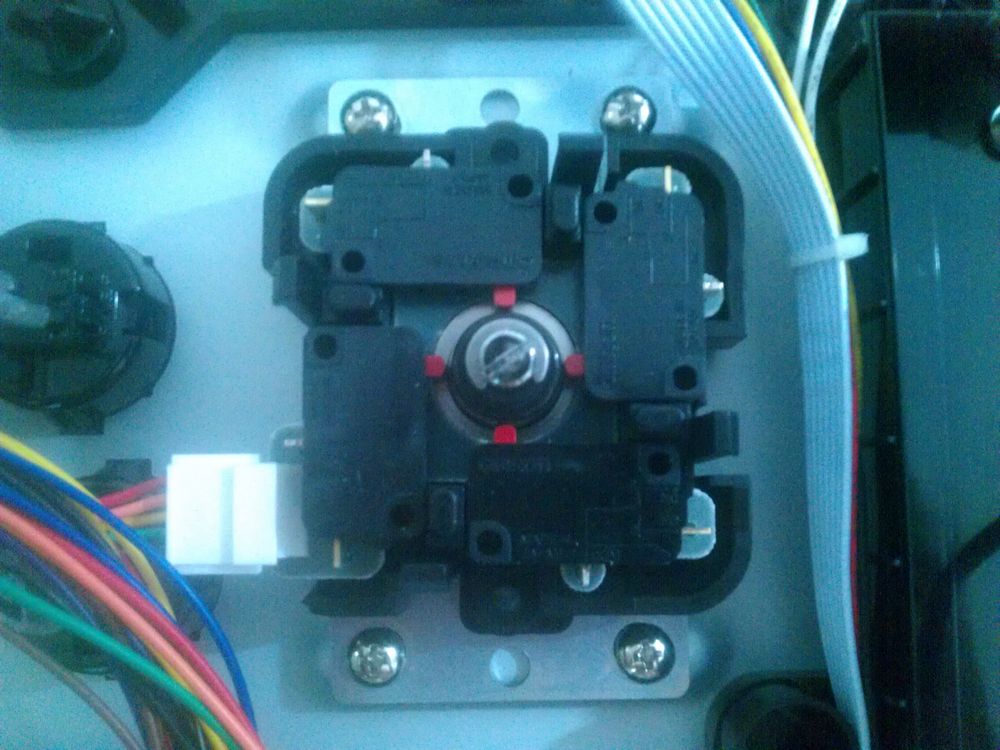
Thinking that some fighting gamers would buy this Qanba Q1 arcade stick and, in future, mod it to add Sanwa parts or Seimitsu parts (or any other compatible parts), we decided to take a look inside it. As you can see on the images above, it is very organized internally and the wires and buttons are plugged by crimp-on quick disconnects, which means no problems for electronic enthusiasts. Also, the button hole is 30mm, so compatible with Seimitsu or Sanwa buttons.

So far, we have not had the need to mod the Qanba Q1 arcade stick, but we hope that those information and images help you case you intend to mod it.


Where can I buy this Qanba Q1 Arcade Stick?

Case you got interested after reading this Qanba Q1 arcade stick review, know that it is for sale on Dealextreme for about $100. Buy it on this link. Also, take a look in other Qanba arcade sticks for sale on Dealextreme.

Freelander PH20 Review (cheap Android tablet)

freelander ph20 review android tablet freelander ph20 review android tablet freelander ph20 review android tablet freelander ph20 review android tablet freelander ph20 review android tablet freelander ph20 review android tablet freelander ph20 review android tablet freelander ph20 review android tablet freelander ph20 review android tablet freelander ph20 review android tablet freelander ph20 review android tablet freelander ph20 review android tablet freelander ph20 review android tablet freelander ph20 review android tablet freelander ph20 review android tablet freelander ph20 review android tablet freelander ph20 review android tablet freelander ph20 review android tablet freelander ph20 review android tablet freelander ph20 review android tablet freelander ph20 review android tablet freelander ph20 review android tablet


Presentation of the Freelander PH20

In this review, we would like to talk about the 7 inch Android tablet Freelander PH20 that we bought on Dealextreme (sku.166593). We will detail its specs and features later in this review, but for now you should know its price: about $67. Obviously, for this price it is not a top Android tablet, but it performs very well when playing videos or running Android games (continue reading this Freelander PH20 review for details), so consider it as a purchase option.

Besides the Freelander PH20 tablet (SXZ-PH20 - Link-create manufacturer), the package also include the following items:

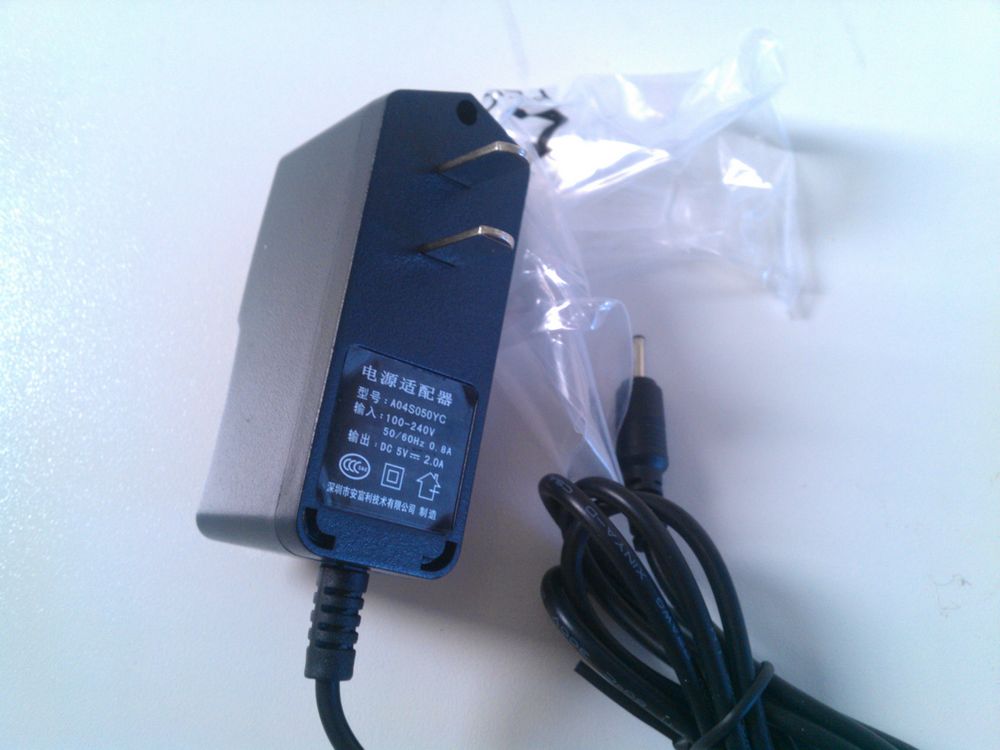
  • 1x Power Supply DC 5V (to recharge).
  • 1x USB OTG adapter (micro B male to standard A female).
  • 1x USB cable (micro B male to standard A male).
  • 1x Start guide (English/Chinese).


Features of the Freelander PH20

Now, to help you know if this Android tablet is worth or not (considering the $67 price), let us describe its main features:

  • Android 4.0.4.
  • Single core AllWinner A13 SoC (CPU Cortex-A8 1.2GHz and GPU Mali-400).
  • 7 inch capacitive screen (5 points) 800x480 of resolution.
  • Memory 512MB DDR3 SDRAM.
  • WiFi 802.11 b/g/n.
  • Front camera 300KP.
  • G-Sensor.
  • 1x TF card slot (maximum 32GB micro SD).
  • 1x 3.5mm earphone jack.
  • 1x USB OTG (supports external USB flash drive, hard disk, keyboard, mouse and some other devices). (*)
  • Rooted (checked with the app "Root Checker Basic").
  • Google Play store already installed.
  • 60 OS languages (the list of languages is shown on the overview video below).
  • Built-in speaker (good sound quality).
  • Built-in microphone.
  • Supports external 3G dongles. (**)
  • Power/Sleep button.
  • Volume up/down buttons.
  • Battery capacity 2800 mAh (3.7V Li-ion) about 3 hours of duration with WiFi on and playing YouTube video.
  • 19.1cm x 11.6cm x 1.2cm of dimensions.
  • 450g of weight.

In our opinion, it is a lot of things for a cheap Android tablet. However, as expected due to its price, it does not have some features that may be important for some. In our opinion, the main missing features are:

  • No HDMI output.
  • No Bluetooth (so far neither with a Bluetooth dongle).
  • No GPS (maybe it is possible to use a USB GPS dongle).
  • No official firmwares so far, but keep monitoring this thread. (***)
  • No custom firmware (we did not find any so far).

Just to clarify things, watch our overview video below showing some features of the Freelander PH20 tablet:


Freelander PH20 - Video Playback Test

As always when reviewing devices capable of play videos, we made (and recorded) some tests to know the video playback performance of the Freelander PH20 tablet.

The tests were put different (codec/format) video files to play and see how well it goes. Note that the ability to play or not a particular codec/format/subtitle is related to software, so installing a proper Android video player app should solve any problem that you may encounter (we used the native video player app). Our tests was intended knowing how well the system can handle video files (1080p, 720p, MP4, etc.), so it is more related to CPU, GPU and firmware.

Check the results for yourself on the video below:

As you probably saw above, all video files played smoothly on the Freelander PH20 tablet.

The formats/codecs of the videos used on the tests was (listed in order of appearance):

  • AVI (AVC/H264) 1280x720 bitrate 4273 Kbps 30 fps.
  • M2TS (AVC/H264) 1920x1080 VBR maximum 25000 Kbps 23.976 fps.
  • MP4 (AVC/MPEG-4) 1920x816 VBR maximum 40000 Kbps 23.976 fps.
  • WMV (VC-1) 1280x720 bitrate 8000 Kbps 29.97 fps.


Freelander PH20 - Gaming Performance Test

Now the part that almost everyone likes: games. For these tests, we chose some free 2D and 3D games available on Google Play (we also used some pre-installed games) to see how well the Freelander PH20 can run them. You can check the gaming performance on the video below:

The games used on the video above are (it runs smoothly if there is no note):


Freelander PH20 - External Devices Test

Since this Android tablet has a USB OTG, you can plug in a USB flash drive (will be mounted at "/mnt/usbhost1"), as you probably saw on the video playback test above, and some other devices. The other ones that we tested was a mouse, a USB 3.0 flash drive (works as USB 2.0), a regular keyboard and a keyboard with a leather case for tablets. All of them worked fine.

We also tried to connect a Bluetooth dongle, just as we did with the Dropad A8, but no success. Maybe it will work in some future firmware (original or custom).


Freelander PH20 - Benchmark Test (AnTuTu, Quadrant and others)

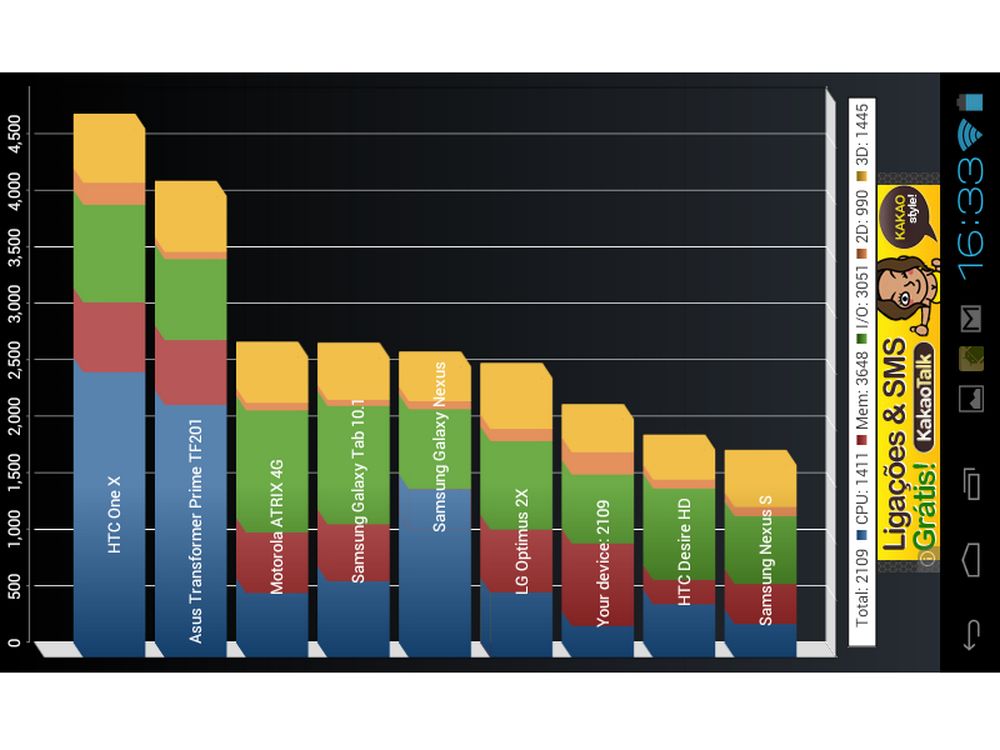
Finally, we tested the Freelander PH20 tablet using some popular Android benchmark apps to see how it scores (points or fps). You can check the Android benchmark apps and the results below or check the detailed benchmark tablet scores on the image gallery at the beginning of this Freelander PH20 review.

  • AnTuTu Benchmark (v3.2.1): 3772.
  • Quadrant Standard Edition (v2.1.1): 2109.
  • Vellamo Mobile Benchmark (v2.0.2): 538 in HTML5 and 187 in METAL.
  • Neocore (v1.9.41): 57.3 fps.
  • NenaMark2 (v2.4): 31.5 fps.


Where can I buy this Freelander PH20?

This cheap Android tablet is for sale at Dealextreme for about $67, more specifically in this link.


Note 1: There may be some incompatible devices.

Note 2: The list of compatible 3G dongles is in one image at the gallery above.

Note 3: It seems there are 3 (three) versions of this tablet: PH20W, PH20L and PH20. You can check the version on the back of the tablet (that code on the corner). We received the PH20L (check image gallery above), which currently do not have firmware updates.